Why Some Links Are Hard to Share-And What to Do About It
Some links are effortless. You glance at them, understand roughly where they lead, and send them on their way.
- Not All Long URLs Are Created the Same
- The Hidden Problems Behind a Difficult-to-Share Link
- Why Do URLs Become So Complicated?
- Deep Website Structures
- Tracking Parameters
- Filters and Search Results
- Dynamically Generated URLs
- Do You Actually Need a Short Link?
- What Makes a Short Link Useful?
- What to Look for in a Free Link Shortener
- Shortening a Link Isn't Always the Right Move
- Think About the Way People Will Use the Link
- Short URL or Original URL?
- A Better Question to Ask About Your Links
Others look like someone accidentally pasted a piece of computer code into the conversation.
You might see a URL packed with folders, numbers, question marks, tracking parameters, and a seemingly endless collection of random characters. It still works. The website loads. Nothing is technically broken. Yet the moment you try to share it, the link suddenly becomes a little annoying.
That's the interesting thing about URLs: something can work perfectly for a website while being inconvenient for a human.
So why do some links become so difficult to share? More importantly, when should you actually do something about it?
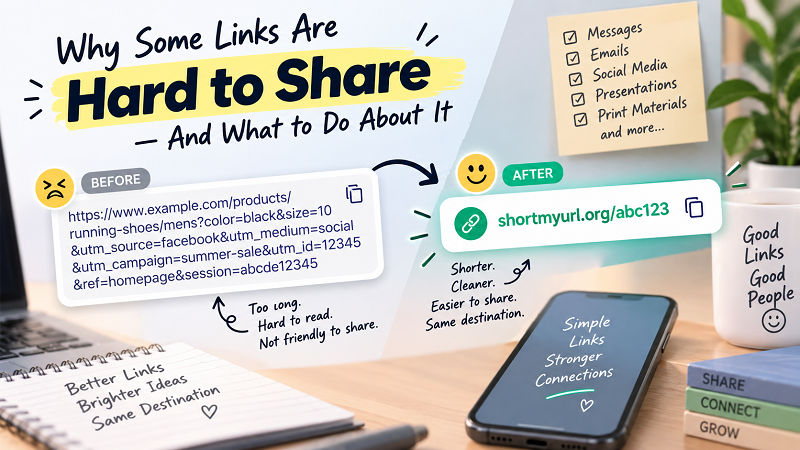
Not All Long URLs Are Created the Same
A long URL doesn't automatically mean there's a problem.
Some websites naturally use detailed URL structures. An online store might include categories, product names, variants, and filters. A marketing platform may add tracking information to identify where a visitor came from. A search page can generate a URL containing information about the search itself.
For example:
example.com/shop/shoes/running/mens/product-name?color=black&size=10&utm_source=email&utm_campaign=fall-sale
Technically, there's nothing wrong with this address. Each part may serve a legitimate purpose.
The problem appears when that URL needs to leave the website and enter the real world.
A URL designed to help a server understand a request isn't necessarily designed to help a person quickly read, remember, type, or communicate it.
That's why it's useful to separate two ideas: a URL can be technically useful while still being inconvenient to share.
The Hidden Problems Behind a Difficult-to-Share Link
The first issue is visual clutter. A long URL can take up an unreasonable amount of space in an email, message, presentation, or social post. Instead of supporting your content, the link starts competing with it.
Then there's the human factor.
Try reading a complicated URL aloud to someone over the phone. You'll probably end up spelling out slashes, hyphens, question marks, numbers, and unfamiliar strings of characters. Even worse, you'll probably have to repeat yourself.
Manual entry creates another problem. When someone has to type a long URL from a poster, printed document, presentation, or another screen, every additional character creates another opportunity for a typo.
And on mobile devices, long URLs can become even more awkward. A link that looks manageable on a desktop screen may wrap across several lines on a phone, making it harder to scan and understand.
None of this means long URLs are inherently bad. It simply means they aren't always the most practical format for sharing.
Why Do URLs Become So Complicated?
There are a few common culprits.
Deep Website Structures
Some websites organize content through multiple layers:
website.com/category/subcategory/topic/product/page
This can be perfectly logical for the website, but the resulting address may be unnecessarily cumbersome for someone who simply wants to share the page.
Tracking Parameters
Marketing teams often append parameters to URLs so they can measure campaigns and traffic sources.
A link might contain information such as:
?utm_source=facebook&utm_medium=social&utm_campaign=summer
Those parameters can be useful for analytics, but the person receiving the link usually doesn't need to see all of them.
Filters and Search Results
E-commerce websites and search platforms frequently add parameters when users filter or sort results. A seemingly simple page can therefore produce a surprisingly long address.
Dynamically Generated URLs
Some applications generate URLs containing IDs, session information, or other technical elements. Again, these may serve a legitimate function behind the scenes without being particularly pleasant to share.
The important takeaway is simple: URL complexity often exists for a reason. You don't necessarily need to change the original URL just because it looks ugly.
Do You Actually Need a Short Link?
This is where it's worth resisting the temptation to shorten everything.
Ask yourself what you're trying to accomplish.
If you're sending a technical resource to a developer who needs to see the exact destination, keeping the original URL may make sense. If the address contains useful descriptive information, shortening it could remove some context that the recipient might appreciate.
But if you're sending a link through a crowded messaging thread, putting it on a presentation slide, sharing it in promotional material, or asking someone to type it manually, the equation changes.
A simple rule of thumb is:
Keep the original URL when transparency or context matters. Consider a short URL when simplicity and shareability matter more.
It's less about whether a URL is objectively "good" or "bad" and more about whether it fits the situation.
What Makes a Short Link Useful?
A short link doesn't magically improve the destination website. What it does is provide a cleaner doorway to that destination.
Instead of asking someone to deal with a complicated address, you can give them something compact and easier to handle.
That can be particularly useful when the link needs to be:
- Shared in a text message
- Included in an email
- Added to a social media post
- Mentioned during a presentation
- Printed on promotional material
- Typed manually
- Remembered for later
There's also a psychological advantage to simplicity. A compact link is easier to recognize at a glance, especially when someone is scanning a message filled with other information.
But there's an important distinction here: shorter doesn't automatically mean better.
The quality of the shortening service matters too.
What to Look for in a Free Link Shortener
If you're going to turn a long URL into a shorter one, don't choose a service based solely on whether it has a big "Shorten" button.
Think about what happens after you create the link.
A useful link shortener free service should make the process straightforward while giving you confidence that the resulting URL will continue to work as expected.
Here are a few things worth checking.
- Does the link remain available? If you're using a short URL on printed material, you don't want it to suddenly stop working after a few weeks.
- Can you customize the address? A memorable alias can be much easier to recognize than a completely random collection of characters.
- Does it provide analytics? If you're sharing links for marketing or campaigns, click information can help you understand whether people are actually using them.
- Is it easy to manage? If you're creating multiple links, keeping track of them can become important very quickly.
- Does it redirect reliably? This sounds obvious, but the most important job of a short link is still getting people to the correct destination.
You don't necessarily need every feature available. The right choice depends on what you're actually doing with the links.
Shortening a Link Isn't Always the Right Move
There's a funny tendency online to treat URL shortening as an automatic upgrade.
Long URL? Make it short.
Problem solved.
Not quite.
There are situations where the original URL is actually preferable. For example, if you're sharing a page with someone who needs to verify the destination before clicking, a descriptive URL can provide useful context.
A short link can also hide information that would otherwise be visible in the original address. That's not inherently bad, but it means users should consider trust and transparency when deciding how to share a link.
And if a URL is already short, readable, and easy to remember, shortening it simply because you can probably doesn't accomplish much.
The best link format is the one that makes sense for the person receiving it.
Think About the Way People Will Use the Link
A better way to approach URL shortening is to start with the situation rather than the tool.
Imagine three scenarios.
You're sending a detailed article to a colleague by email. The original URL is reasonably readable. Keeping it may be perfectly fine.
Now imagine you're putting a registration link on a presentation slide. A huge URL stretches across the screen and forces you to reduce the font size. A shorter version suddenly makes the design much cleaner.
Finally, imagine printing a URL on a flyer. Someone may need to manually type it into their phone. In this case, reducing the number of characters can directly reduce the effort required to reach the destination.
Same website. Same destination. Completely different sharing requirements.
That's why there isn't one universal answer for every URL.
Short URL or Original URL?
Instead of thinking of URL shortening as a rule, think of it as a formatting decision.
- Original URL: useful when the destination needs to be transparent or descriptive.
- Short URL: useful when compactness, readability, memorability, or manual entry are important.
- QR code: useful when people are accessing a destination from a physical surface using a smartphone.
You can even combine formats. A poster, for example, might include both a short URL and a QR code. One person can scan it instantly, while another can type the address manually.
The point isn't to force one format onto every situation. It's to remove unnecessary friction wherever you can.
A Better Question to Ask About Your Links
Instead of asking, "Is this URL too long?" ask:
"Will this URL make it harder for someone to do what I want them to do?"
That's a much more useful question.
If the answer is no, leave the URL alone. There's no prize for turning a perfectly good link into an even shorter one.
If the answer is yes, shortening it can be a small but meaningful improvement. A cleaner link can make your message easier to read, your design easier to manage, and the overall sharing experience less frustrating.
In the end, URL shortening isn't really about making a string of characters smaller.
It's about making the path between a person and the information they want a little simpler.