How to Create a Clean Link for Social Media, Flyers, and Print
A URL can work perfectly and still be a pain to use. That becomes especially obvious when you take a long web address out of a browser and put it somewhere people have to actually see, remember, type, or share. A huge URL might be perfectly acceptable in a browser bar, but on a flyer, presentation slide, business card, or social media post, it can quickly turn into visual clutter.
- Start With the Destination
- Think About Where People Will See the Link
- Create the Short Version
- Make the Link Easy to Recognize
- Design Around the Final Link
- What About QR Codes?
- Test Before You Publish
- One Destination, Many Ways to Share It
- Make the Link Work for the Person Using It
That's why creating a clean link isn't simply about making a URL shorter. It's about choosing a format that works naturally wherever people encounter it. The destination stays the same; what changes is how easy it is for someone to reach that destination.
Start With the Destination
Before worrying about the length of a URL, start by identifying exactly where you want people to go. It could be a product page, event registration form, booking page, social profile, portfolio, article, or campaign landing page. Once you've found the right page, copy its complete URL rather than trying to manually remove pieces that look unnecessary.
For example, a campaign page might have an address like example.com/events/summer-community-event/register?source=print&utm_campaign=summer2026. Some of those parameters may be useful to the website or its analytics, even though they're not particularly useful to someone reading the link. The important thing is to preserve the original destination and let the shortening process create a more convenient version for sharing.
Think About Where People Will See the Link
A URL doesn't exist in isolation. The way people interact with it depends heavily on where you put it. A link shared in a social media post has different requirements from one printed on a business card, and a presentation slide creates a different experience again.
On social media, long URLs can add unnecessary visual noise to an already busy post. A compact address gives your actual message more room to breathe and makes the link feel like part of the content rather than a giant block of technical information. This can be particularly useful when you're promoting a specific campaign, product, article, or registration page.
Printed materials create an even more obvious challenge. Someone looking at a flyer or poster may not have a clickable link in front of them, which means they might have to type the address manually. A shorter URL reduces the amount of work involved and also reduces the chance of someone mistyping a character and ending up somewhere else.
The same principle applies to business cards. Space is limited, and nobody wants a tiny web address squeezed into the corner because the original URL takes up half the card. A compact link can sit naturally alongside your name, phone number, email address, and other contact details without overwhelming the design.
Presentations have their own problem. A long URL may force you to shrink the font or dedicate an entire section of the slide to an address that isn't actually the main point of your presentation. A cleaner link can be displayed prominently while leaving the rest of the slide readable.
Create the Short Version
Once you've chosen the destination and considered how people will interact with the link, it's time to create a more practical version. A short url generator can turn a lengthy destination address into a compact URL that is easier to display, share, and remember.
The important part is not simply making the address as short as humanly possible. A useful short link should fit the context in which you'll use it. If you're putting it on a poster, readability matters. If you're saying it out loud during a presentation, memorability matters. If you're using it in a marketing campaign, you may also care about tracking and link management.
In other words, don't optimize for character count alone. Optimize for how easily another person can use the link.
Make the Link Easy to Recognize
If your shortening service allows custom aliases, you may be able to make the resulting address more meaningful. Compare a random address such as shortmyurl.org/x7Kp92 with something like shortmyurl.org/summerfest. The second version immediately gives the reader some context and can be easier to communicate verbally.
This can be particularly useful for events, promotions, campaigns, and other situations where the link is going to appear outside a browser. However, don't force a clever alias if it makes the URL confusing or misleading. The purpose of customization is to improve recognition, not to turn every link into a branding exercise.
Design Around the Final Link
One surprisingly common mistake is creating the artwork first and worrying about the URL afterward. By that point, the design may already be packed with text, images, logos, and other elements, leaving you with nowhere sensible to put a long address.
It's much easier to generate and test the final link before you finish the design. You can then decide how much space the URL needs and build the surrounding layout accordingly. This is especially important for flyers, posters, business cards, menus, event materials, and presentation slides where every bit of space matters.
The URL also doesn't need to be the visual star of the piece. Your headline should communicate the main message, your offer or event details should be easy to understand, and the link should provide a clear next step. Good design makes the path obvious without making every element compete for attention.
What About QR Codes?
For printed materials, a QR code can be a natural companion to a short URL. The two serve slightly different purposes: a QR code lets someone scan the destination with a phone, while a short URL gives people a simple address they can type, remember, or share manually.
For example, a poster might encourage people to scan a QR code while also displaying a short address underneath for anyone who prefers to type it. This gives people two ways to reach the same destination without requiring you to create separate pages or complicated instructions.
The trick is to keep the experience simple. One clear destination with two convenient access methods is usually more useful than filling a poster with multiple URLs and QR codes that leave people wondering which one they are supposed to use.
Test Before You Publish
A clean-looking URL is only useful if it actually works. Before printing a batch of flyers or publishing a campaign, open the short link yourself and confirm that it reaches the intended page. Test it on a phone as well as a desktop, and if the link will appear on printed material, consider how easily someone can read and type it.
If you're also using a QR code, test that separately. Scan it from the size and approximate distance at which people are likely to encounter it. Check the surrounding design too: the URL should be readable, the QR code should have enough space around it, and neither element should be buried among other visual distractions.
These checks take only a few minutes, but they can prevent a surprisingly annoying problem later. Fixing a URL before hundreds of flyers are printed is considerably easier than discovering a mistake after the entire campaign has gone live.
One Destination, Many Ways to Share It
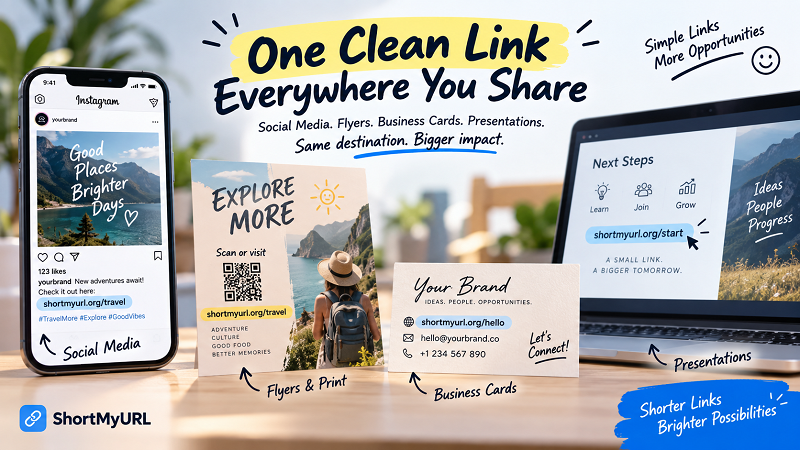
A well-designed short link can work across multiple environments without requiring a different destination every time. The same address can appear in a social media post, on a presentation slide, on a business card, and on a printed flyer, giving people a consistent way to reach the same page.
That's one of the biggest advantages of thinking about links as part of the user experience rather than as technical addresses. The website may only care that the URL reaches the correct destination, but your audience cares about whether the link is easy to understand and use.
Make the Link Work for the Person Using It
Creating a clean URL isn't about following a rule that says every long address must be shortened. Some original URLs are already readable and useful, and there are situations where showing the full destination makes sense. The better approach is to look at how people will encounter the link and remove friction where it actually exists.
For social media, that might mean reducing visual clutter. For a business card, it might mean saving precious space. For a flyer or poster, it could mean making manual typing easier. For a presentation, it might simply mean keeping the slide clean and readable.
The destination hasn't changed. You're simply making the journey there easier.
And that's really the point of a clean link: not just fewer characters, but less friction between your audience and the page you want them to reach.