The Link You Need Isn’t Always the Link You Should Share
Your browser gives you a link to a page. You copy it. You send it. Done.
- Your browser gives you a destination, not necessarily a shareable link
- Why useful pages often have complicated addresses
- The problem appears when the URL leaves the website
- Don't confuse a complicated URL with a broken URL
- Four questions to ask before sharing a generated link
- A short link can work as a presentation layer
- Where this matters more than you might expect
- What to look for in a short link generator
- Stop thinking of URLs as one-size-fits-all objects
- Don't optimize the URL. Optimize the handoff.
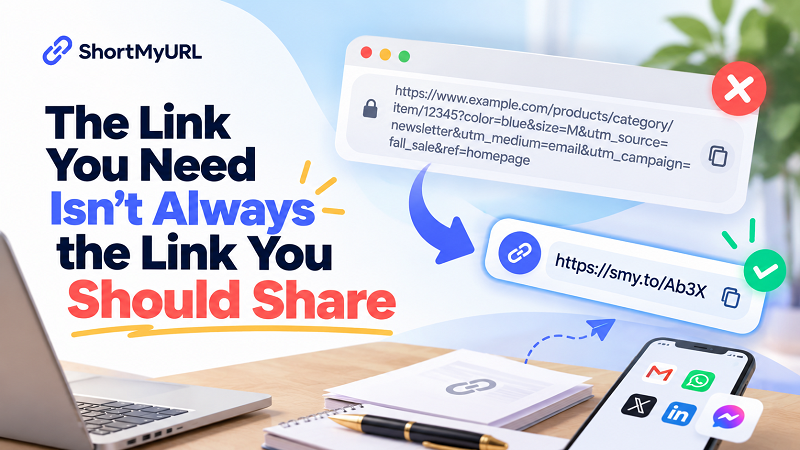
Except sometimes the link sitting in your browser isn't really the link you want to hand to another person. It may point to exactly the right page, but it's packed with folders, IDs, filters, tracking parameters, session details, or other pieces of information that make sense to a website and almost none to a human being.
That's an easy distinction to miss because we tend to treat a URL as the destination itself. It isn't quite that simple. The URL is an address that helps a system locate something on the web. The moment you copy that address and send it to another person, though, you're also making a communication decision. You're deciding how that destination will be presented, passed around, and eventually used.
And sometimes the address your website generates simply isn't the best version of that destination to share.
Your browser gives you a destination, not necessarily a shareable link
Think about the last time you found something useful online. Maybe it was a product, an article, a registration page, a document, a specific section of a website, or a page containing exactly the information someone had asked you to find. You probably didn't stop to inspect the URL. You simply copied it because the browser had already done the hard work of getting you there.
That's perfectly logical. The browser cares about reaching the correct destination. It doesn't care whether the address looks elegant when pasted into a group chat.
People do.
A URL can contain perfectly legitimate technical information that is useful to the website but completely unnecessary for the person receiving it. A long path may describe how the page is organized internally. Query parameters may tell a system which version of a page to display. IDs may identify a particular item in a database. Tracking parameters may provide marketing or analytics information. None of this is inherently bad. It simply means that the address has been built for more than one audience.
The website sees data. The person sees a very long line of characters.
Why useful pages often have complicated addresses
There's a reason you can land on a genuinely useful page and still end up with a URL that looks like it escaped from a programming tutorial. Websites have layers, and those layers sometimes show up in the address.
An online store may need to identify a particular product, category, variation, or filtered result. A publishing platform may organize content through several levels of categories. A web application may use parameters to remember a user's selections. A campaign page may include information about where visitors came from. A search page can generate a completely different URL depending on what someone searched for and which filters they selected.
Again, none of this automatically means the URL is bad.
In fact, changing the original URL simply because it looks complicated can sometimes be a terrible idea. The website may rely on that structure. The parameters may serve a legitimate purpose. Removing them without understanding what they do could change the destination or remove information the site needs.
The smarter move is to separate two things that are often treated as one: the URL a website needs and the URL a person needs to share.
Those can be different.
The problem appears when the URL leaves the website
A complicated URL sitting quietly inside a browser isn't causing anyone much trouble. The problem starts when you move it somewhere else.
Paste it into a customer email and suddenly the message looks heavier than it needs to. Drop it into a presentation and it can dominate the slide. Put it into a printed document and you may have created something that is difficult to type. Send it through a messaging app and the address may wrap across multiple lines.
None of these situations change the destination. They change the experience of passing the destination from one person to another.
This is why thinking about URLs purely as technical addresses can be limiting. A shared link is also a piece of communication. Its job isn't only to point somewhere; it has to survive the journey between sender and recipient.
That journey might take three seconds when someone taps a clickable message. It might take thirty seconds when a customer copies the address into another application. It might take several minutes when someone has to type a printed URL character by character.
The destination stays the same. The sharing environment changes completely.
Don't confuse a complicated URL with a broken URL
There is another trap worth avoiding: assuming that a messy-looking URL needs to be fixed.
It doesn't.
A long URL can be completely valid, secure, stable, and useful. In some cases, the complexity is necessary. A web application might need several parameters to know exactly what content to display. A shopping site might use identifiers that help its system locate a particular product. A specialized platform may generate URLs that look strange because the underlying service is doing something more sophisticated than serving a simple static page.
So don't judge a URL entirely by its appearance.
The better question is what happens when you share it.
If the address works, contains useful context, and fits naturally into the place where you're putting it, leave it alone. There is no prize for shortening a perfectly good URL. But if the address is technically fine and practically awkward, creating a cleaner sharing version can make sense.
That distinction prevents a lot of unnecessary URL tinkering.
Four questions to ask before sharing a generated link
Before sending a complicated URL, look at the situation rather than the URL alone. First, ask whether the recipient needs to see the entire address. If the answer is no, displaying a long technical string may add noise without adding useful information. Second, consider the device. A URL that is harmless on a desktop can be frustrating on a small screen, particularly when someone needs to copy or retype it.
Third, think about the environment where the link will appear. A customer email, internal message, presentation slide, printed flyer, and social post all have different constraints. A URL that works beautifully in one environment may look ridiculous in another. Finally, ask whether the address contains information that is useful to the recipient or merely useful to the system behind the page. That doesn't mean the extra information should be deleted; it may simply mean that you shouldn't force the recipient to carry it around visually.
This is a much more practical way to evaluate a link than simply counting characters.
A short link can work as a presentation layer
Here's a useful way to think about shortened URLs: they don't have to replace the destination; they can simply provide a cleaner way to present it.
Imagine the process as three stages. Your website has a destination URL. You need to share that destination with another person. Instead of exposing the entire technical address, you create a compact sharing version that redirects to the original destination.
The destination remains important. The short link simply becomes the thing you hand to the human.
That distinction matters because it changes the purpose of shortening. You're not trying to redesign the website's URL structure. You're not trying to make the original address disappear. You're creating a more convenient bridge between the destination and the person who needs to access it.
It's a small change, but it makes much more sense than thinking of every long URL as something that needs to be “fixed.”
Where this matters more than you might expect
Customer communication is an obvious example. If someone asks a business for a specific product, service, registration page, or document, sending a gigantic URL technically answers the question, but it may not be the cleanest way to do it. A shorter sharing link can make the message easier to scan and easier to pass along.
Events create another good example. An event registration page may sit inside a larger website and have a complicated address. The page itself might be exactly right, but asking someone to type that address from a poster or printed invitation is a different story. The same problem appears in presentations, classroom materials, internal documentation, support messages, and promotional content.
Even ordinary personal sharing can benefit. You find a page someone needs, copy the URL, and realize that the address is enormous. You could send it anyway. But if the person might need to copy it somewhere else or type it manually, a cleaner version can remove a small piece of friction.
None of these cases require a complicated marketing strategy. Sometimes the problem is simply that the internet generates addresses that humans weren't really meant to memorize.
What to look for in a short link generator
If you're going to create a shorter sharing version, the tool itself should stay out of your way. A link generator short workflow should be quick enough that creating the shareable version doesn't become more work than sharing the original.
The basics matter more than a mountain of unnecessary features. You want the destination to remain accurate, the generated link to be easy to copy, and the process to be straightforward. If you need a custom alias, that can be useful too, particularly when the link is going into a presentation, printed material, or a customer-facing message where readability matters.
Most importantly, the generated link should solve the original problem rather than create another one. There is little value in replacing one confusing URL with a different confusing URL. The goal is simple: make the handoff easier.
Stop thinking of URLs as one-size-fits-all objects
One of the easiest mistakes in online publishing is assuming that the URL shown in the browser is automatically the URL that should be shared everywhere.
It isn't.
The browser address is a technical interface between you and a website. The link you send to another person is a communication tool. They overlap, but they serve different moments in the journey.
That doesn't mean every URL needs a shortened version. Quite the opposite. A clean, descriptive address may already be ideal. If it works well in the context you're using it, there's no reason to change it.
But when the original address is clearly designed more for systems than people, creating a cleaner sharing version can be a surprisingly useful little upgrade.
Don't optimize the URL. Optimize the handoff.
This is the part worth remembering.
The person receiving your link doesn't care how many parameters were generated by the website. They don't care which database ID identifies the page. They probably don't care how many folders exist between the domain and the final destination.
They care about one thing: Can I get where I need to go without unnecessary hassle?
That's why the best shared link isn't necessarily the original URL, and it isn't necessarily the shortest URL either. It's the version that fits the situation.
Sometimes that means sharing the original address exactly as it is. Sometimes it means removing unnecessary clutter from the presentation. And sometimes it means creating a dedicated short link that gives the recipient a much cleaner path to the same destination.
The web may be built around URLs, but sharing the web is ultimately about people. Once you start looking at links from that perspective, the question changes from “Is this URL correct?” to something much more useful:
“Is this the best version of this destination to hand to someone else?”
That is a much better question to ask before hitting Send.