How to Shorten a URL for Free: A Simple Step-by-Step Guide
Some URLs are short and civilized.
- Why Shorten a URL?
- How to Shorten a URL for Free
- Step 1: Copy the URL You Want to Shorten
- Step 2: Open a Free URL Shortener
- Step 3: Paste Your URL
- Step 4: Create Your Short URL
- Step 5: Customize Your Short Link
- Step 6: Copy and Share Your Link
- Can You Shorten a URL Without an Account?
- How to Manage Your Short URLs
- How to Track Clicks on a Short URL
- Can You Create a QR Code From a Short URL?
- What Should You Check Before Sharing a Short URL?
- 1. Test the link
- 2. Check the destination
- 3. Check your custom alias
- 4. Consider link longevity
- When Is a Short URL Especially Useful?
- Shorten Your URL With ShortMyURL
- Final Thoughts
Others look like they were written by a computer having a very bad day.
A long web address can contain folders, product IDs, tracking parameters, campaign information, and enough random characters to make you wonder if you accidentally copied an entire sentence.
Luckily, you don't have to share all of that.
A URL shortener can turn a long web address into a compact link that is easier to share, remember, and use.
And the best part? You can shorten a URL for free in just a few seconds.
Here's how.
Why Shorten a URL?
Before we jump into the steps, let's answer the obvious question: why bother?
A long URL can work perfectly well, but that doesn't mean it's pleasant to share.
A shortened URL can be useful when you want to:
- Share a link on social media
- Send a link through text or messaging apps
- Add a link to a flyer or poster
- Create a QR code
- Make a URL easier to remember
- Share a cleaner-looking link
- Track clicks on a shared link
- Create a custom, recognizable URL
For example, compare these two:
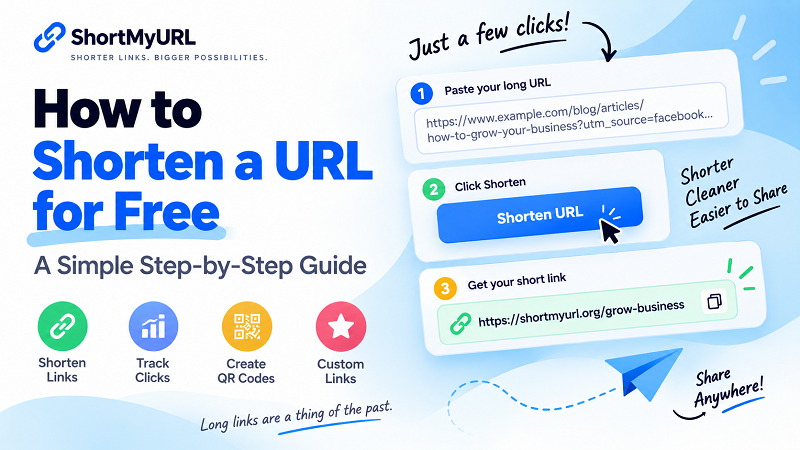
https://www.example.com/blog/articles/how-to-grow-your-business?utm_source=facebook&utm_medium=social&utm_campaign=summer
and:
https://shortmyurl.org/grow-business
Both can take visitors to the same destination.
One just has a lot less baggage.
How to Shorten a URL for Free
The process is simple and doesn't require technical skills.
Step 1: Copy the URL You Want to Shorten
Start by finding the webpage you want to share.
It could be:
- A blog post
- Product page
- YouTube video
- Online store
- Social media profile
- Landing page
- Event page
- Any other public webpage
Copy the complete URL from your browser's address bar.
Make sure you copy the entire address. If the URL contains important parameters, removing part of it could send visitors to the wrong destination.
Step 2: Open a Free URL Shortener
Next, open a URL shortening tool.
With ShortMyURL, you can paste your long URL directly into the shortening tool and create a short link without creating an account first.
No complicated setup.
No coding.
No need to become a URL engineer.
Just paste the link and you're ready to go.
Step 3: Paste Your URL
Paste your original URL into the URL shortener's input field.
For example:
https://www.example.com/products/summer-running-shoes
Once you've entered the address, the tool can generate a shorter version.
If you're using a URL with tracking parameters, check the destination carefully before sharing your new link.
Step 4: Create Your Short URL
Click the button to shorten your URL.
The service will generate a compact link connected to your original destination.
For example:
Original:
https://www.example.com/products/summer-running-shoes
Shortened:
https://shortmyurl.org/run-shoes
That's it.
You now have a short URL ready to copy and share.
Step 5: Customize Your Short Link
Depending on the URL shortener you're using, you may also be able to create a custom alias.
Instead of receiving a random combination of characters, you can choose something meaningful.
For example:
shortmyurl.org/black-friday
or:
shortmyurl.org/new-product
A custom alias can make your link easier to recognize before someone clicks it.
It's particularly useful for marketing campaigns, promotions, events, and links that you'll be sharing repeatedly.
Just remember: shorter is usually better.
A custom alias shouldn't turn your short URL into another long URL wearing a fake mustache.
Step 6: Copy and Share Your Link
Once your short URL is ready, copy it.
You can then use it wherever you need:
- Facebook posts
- Instagram profiles
- X posts
- Emails
- Text messages
- Websites
- Digital ads
- Printed materials
- QR codes
Because the URL is shorter, it's easier to copy, paste, read, and share.
Can You Shorten a URL Without an Account?
Yes, depending on the URL shortening service.
Some tools require you to register before creating a link. Others allow you to shorten URLs immediately without an account.
With ShortMyURL, an account isn't required just to create a short link.
However, creating an account can be useful if you want to manage your links in one place and keep track of their performance.
If you're only shortening a single URL, using the tool without an account may be all you need.
If you're creating links regularly, an account can make things much easier to manage.
How to Manage Your Short URLs
If you create lots of shortened links, things can get messy surprisingly quickly.
One link becomes five.
Five become twenty.
Suddenly you're staring at a list of mysterious URLs wondering which one was for that campaign three months ago.
This is where link management becomes useful.
With an account, you can keep your shortened links organized and make it easier to find the links you've created.
For businesses, marketers, creators, and anyone who shares lots of links, having a central place to manage them can save time.
How to Track Clicks on a Short URL
A short URL can do more than simply redirect visitors.
Some URL shortening services also provide click analytics.
Analytics can help you understand whether people are actually clicking your links.
Depending on the service, you may be able to see information such as:
- Total clicks
- Click activity over time
- Referral sources
- Devices
- Geographic information
Imagine you're promoting the same article on several platforms.
Instead of guessing which link is getting attention, click data can give you a clearer picture of how your shared links are performing.
For anyone doing marketing, this can turn a simple shortened URL into a useful measurement tool.
Can You Create a QR Code From a Short URL?
Absolutely.
A short URL works particularly well with QR codes.
You can create a QR code that points to your shortened link and then use it on physical materials such as:
- Business cards
- Restaurant menus
- Product packaging
- Posters
- Flyers
- Event signage
- Store displays
Someone scans the QR code with their phone and is redirected to the destination webpage.
The combination of a short URL and QR code gives you flexibility for both digital and offline sharing.
What Should You Check Before Sharing a Short URL?
Before sending your new link to the world, take a few seconds to check it.
1. Test the link
Open the shortened URL yourself.
Make sure it redirects to the correct webpage.
2. Check the destination
Make sure the original page is publicly accessible and doesn't require unexpected permissions or login access.
3. Check your custom alias
If you created a custom URL, make sure it's spelled correctly.
A typo in a short link can be surprisingly annoying to fix after you've printed it on 500 flyers.
4. Consider link longevity
If you're using a short URL on something permanent, such as printed packaging or signage, make sure you understand the shortening service's policies regarding link availability and expiration.
A link that works today but disappears later isn't much help.
When Is a Short URL Especially Useful?
You don't need to shorten every URL.
If you're sending a five-character URL to a friend, shortening it would be a little like putting a backpack on a backpack.
But for long addresses, short links can be extremely convenient.
Consider using a short URL when:
You're sharing on social media
A shorter link keeps your post cleaner and leaves more room for your actual message.
You're sending links in messages
Long URLs can make messages harder to read, especially on mobile devices.
You're printing a URL
Shorter addresses are easier for people to read and manually type.
You're running a campaign
Custom short links can make campaign URLs easier to recognize and share.
You want click data
A URL shortening service with analytics can help you understand how your links are being used.
You're creating QR codes
Short URLs are convenient destinations for QR codes used in both digital and physical marketing.
Shorten Your URL With ShortMyURL
Got a long URL sitting in your clipboard right now?
You can shorten it in a few clicks with ShortMyURL.
Paste your URL, create your short link, and you're ready to share.
If you want more control, you can also use a custom alias, create QR codes, and manage your links with an account.
[Shorten a URL for free with ShortMyURL →]
No need to overthink it.
Long link in.
Short link out.
Done.
Final Thoughts
Learning how to shorten a URL doesn't require any technical knowledge.
The basic process is simple:
- Copy your long URL.
- Open a URL shortening tool.
- Paste your URL.
- Create your short link.
- Customize it if needed.
- Test it.
- Share it.
The real value comes from what you do with the short link afterward.
For casual sharing, a simple short URL may be all you need. For marketing campaigns and ongoing projects, features like custom aliases, click tracking, QR codes, and link management can make shortened URLs much more useful.
So the next time you encounter a URL that's longer than your grocery list, you know what to do.
Shorten it. Share it. Move on.