How to Make a Long URL Shorter Without Breaking the Link
You know that moment when you copy a URL and realize it's basically an entire paragraph?
- First: Don't Just Cut Pieces Out of the URL
- What Actually Makes a URL Long?
- The Domain
- The Path
- Query Parameters
- Tracking Parameters
- IDs and Other Data
- Three Ways to Deal With a Long URL
- Option 1: Leave It Alone
- Option 2: Simplify the Original URL
- Option 3: Create a Short Link
- How to Make a Long URL Shorter With a Short Link
- 1. Start With the Exact Destination
- 2. Put the URL Into a Short Link Generator
- 3. Create the Short Version
- 4. Test It Before Sharing
- 5. Replace the Long URL in Your Content
- Here's a Real-World Example
- What About the Extra Parameters?
- When Is a Long URL Actually a Problem?
- Sharing in a Text Message
- Posting on Social Media
- Adding a URL to a Presentation
- Printing a Link
- Sharing a Link Verbally
- When Should You NOT Shorten a URL?
- When the URL Is Already Short
- When the Full URL Provides Useful Context
- When You're Designing Your Website's URL Structure
- Short Link vs. Changing Your Website URL
- Short Link
- Website URL Change
- Can a Short Link Be Custom?
- Good Custom URLs Are Simple
- What If You Need Different Links for Different Campaigns?
- What Makes a Long URL "Too Long"?
- What About SEO?
- A Simple Checklist Before You Share
- Destination
- Custom Alias
- Context
- Long-Term Use
- Tracking
- Make Your Long URL Shorter With ShortMyURL
- Frequently Asked Questions
- How do I make a long URL shorter?
- Can I make a URL shorter without changing the destination?
- Should I delete parts of a long URL?
- How do I shorten a URL without breaking it?
- Can I customize a short URL?
- Why is my URL so long?
- Is a short URL better than a long URL?
- Can I use a short URL for a printed flyer?
- Can multiple short links point to the same webpage?
- Do I need to change my website's URL to make it shorter?
- Final Takeaway
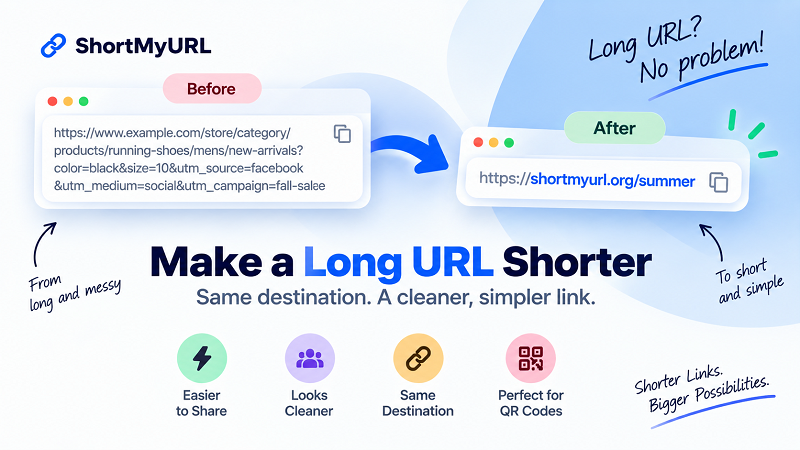
Maybe it looks something like this:
https://www.example.com/store/category/products/running-shoes/mens/new-arrivals?color=black&size=10&utm_source=facebook&utm_medium=social&utm_campaign=fall-sale
Technically, there's nothing wrong with it.
But try putting that link on a poster, sending it in a text, reading it over the phone, or asking someone to type it into a browser.
Suddenly, that perfectly functional URL becomes a little annoying.
So, how do you make a long URL shorter?
The trick is not to start deleting random characters. Instead, create a short link that points to the original URL.
Here's how to do that without breaking the destination.
First: Don't Just Cut Pieces Out of the URL
When people see an enormous URL, the first instinct is often:
"I'll just delete some of this stuff."
That's where things can go wrong.
A URL isn't necessarily just a readable path. Different parts can tell a website what content to display, what filters to apply, what product to load, or where traffic came from.
For example:
example.com/products/shoes?color=blue&size=10
Removing:
?color=blue&size=10
could potentially change what the visitor sees.
And tracking parameters can have their own purpose.
So if your goal is simply to create a shorter link for sharing, manually editing the original URL isn't usually the right solution.
What Actually Makes a URL Long?
Before choosing a solution, let's look at where all those extra characters come from.
A typical web address can contain several components.
The Domain
This is the main website address:
example.com
Usually, this isn't the part causing your URL problem.
The Path
The path tells the website which resource or page you're requesting:
example.com/blog/marketing/social-media
A deeply nested website can naturally produce a longer path.
Query Parameters
Parameters appear after a question mark:
example.com/product?color=blue&size=10
They can provide additional information to the website.
Tracking Parameters
Marketing links often contain parameters such as:
utm_source
utm_medium
utm_campaign
These can make an otherwise reasonable URL much longer.
IDs and Other Data
Some websites use product IDs, article IDs, search parameters, filters, or other values in their URLs.
Put enough of these pieces together and you end up with a URL that looks like it needs its own table of contents.
Three Ways to Deal With a Long URL
If you have a long address, there are several possible approaches.
Option 1: Leave It Alone
This is completely fine if the URL is already practical to use.
A long URL isn't automatically a bad URL.
If you're sharing it as a clickable hyperlink, length may not matter much.
Option 2: Simplify the Original URL
If you control the website, you may be able to redesign the URL structure.
For example, a site owner might turn:
example.com/blog/category/article-title
into:
example.com/article-title
But this is a website-development decision, not something you should casually do to a URL you don't control.
Changing an existing URL can also have SEO, redirect, bookmarking, and sharing implications.
Option 3: Create a Short Link
If the webpage is fine and you simply want a more convenient address to share, this is where URL shortening makes sense.
Instead of changing:
example.com/really/long/destination
you create something like:
shortmyurl.org/guide
The original destination remains intact.
This is usually the easiest option when the problem is sharing, rather than the website's URL architecture itself.
How to Make a Long URL Shorter With a Short Link
Here's the practical approach.
1. Start With the Exact Destination
Open the page you want people to visit.
Don't start by trying to shorten the URL manually.
Copy the complete address from your browser.
For example:
https://www.example.com/resources/complete-guide-to-online-marketing
That's your destination.
2. Put the URL Into a Short Link Generator
Use a short link generator to create a compact address.
Paste your original URL into the tool.
The important thing here is that you're giving the service the destination you actually want people to reach.
3. Create the Short Version
Generate the short link.
You might receive something like:
shortmyurl.org/k8F2x
If custom aliases are supported, you may instead choose a recognizable ending.
For example:
shortmyurl.org/marketing
4. Test It Before Sharing
This step takes seconds and is absolutely worth doing.
Open the new short URL.
Make sure it lands on the exact page you intended.
If you're using the link for a campaign, printed material, or anything that will be difficult to change later, testing is especially important.
5. Replace the Long URL in Your Content
Now you can use the shorter address wherever the original URL was going to appear.
That's it.
You didn't modify the webpage.
You didn't chop up the original URL.
You simply created a more convenient route to the same destination.
Here's a Real-World Example
Imagine you're promoting a summer sale.
Your website gives you this URL:
https://www.example.com/shop/summer-collection/mens-shoes?utm_source=instagram&utm_medium=social&utm_campaign=summer-sale
It works perfectly.
But posting that giant address directly isn't particularly attractive.
You could create a short link such as:
shortmyurl.org/summer
Now your social post can contain:
Shop the summer collection: shortmyurl.org/summer
Much cleaner.
And the destination can remain the same.
What About the Extra Parameters?
This is where things get interesting.
You may notice that the long URL contains something like:
?utm_source=instagram&utm_medium=social
Should you delete it?
Not necessarily.
Those parameters may be used for campaign attribution or other purposes.
If you don't control the website or aren't sure what a parameter does, don't remove it just because it makes the URL ugly.
Instead, give the complete destination URL to the shortening service.
That way, you're solving the sharing problem without guessing which parts of the original address are safe to remove.
When Is a Long URL Actually a Problem?
URL length isn't automatically a problem.
It's a problem when the address gets in the way of what you're trying to do.
Sharing in a Text Message
A huge URL can make a text message look messy.
A shorter link keeps the conversation readable.
Posting on Social Media
If the platform displays the URL directly, a long address can take up unnecessary space.
A compact link can make the post easier to scan.
Adding a URL to a Presentation
Imagine putting a 150-character URL on a slide.
Now imagine asking everyone in the room to type it.
Exactly.
A short URL is much more practical.
Printing a Link
Printed URLs have a unique problem: people can't simply click them.
They have to type them.
A shorter address means less work and fewer opportunities for typos.
Sharing a Link Verbally
Try reading a complicated URL aloud.
It gets awkward quickly.
A short, recognizable link is much easier to communicate.
When Should You NOT Shorten a URL?
Shortening isn't always the answer.
There are situations where keeping the original URL makes more sense.
When the URL Is Already Short
If you have:
example.com/about
there isn't much to fix.
When the Full URL Provides Useful Context
A descriptive URL can tell users what page they're visiting.
For example:
example.com/pricing
is immediately understandable.
Turning it into an unrelated-looking short link may remove that context.
When You're Designing Your Website's URL Structure
If you're the website owner and you're unhappy with your URLs, a short-link service isn't necessarily the underlying solution.
You may need to review your site's URL architecture instead.
That's a development and SEO decision, not simply a link-sharing problem.
Short Link vs. Changing Your Website URL
These two things are easy to confuse.
They're actually very different.
Short Link
You create an additional URL that redirects to an existing destination.
The original page stays where it is.
Website URL Change
You actually change the address of the webpage.
For example:
example.com/old-page
becomes:
example.com/new-page
That can require redirects, updates to internal links, sitemap changes, and other technical considerations.
If all you want is a shorter address to share, don't rebuild your website just because one URL is ugly.
A short link may solve the actual problem much more simply.
Can a Short Link Be Custom?
Some URL shortening services let you choose the ending of the link.
Instead of:
shortmyurl.org/7xP92
you might be able to create:
shortmyurl.org/menu
or:
shortmyurl.org/event
when the alias is available.
This can be useful because a short link doesn't have to be completely random.
Good Custom URLs Are Simple
Try to make the ending:
- Short
- Easy to spell
- Easy to say
- Relevant to the destination
- Easy to remember
Avoid stuffing unnecessary words into it.
The whole point is simplicity.
What If You Need Different Links for Different Campaigns?
Here's a useful trick.
Suppose you're sending people to the same landing page from three places:
- Social media
- Printed flyers
Instead of using one identical short link everywhere, you could create separate short links when your link-management system supports it.
For example:
shortmyurl.org/email
shortmyurl.org/social
shortmyurl.org/flyer
All three could point to the same destination.
If analytics are available, separate links can also make campaign activity easier to distinguish.
That's one of the places where short links become more than just a way to make a URL look nicer.
What Makes a Long URL "Too Long"?
There isn't one magic character count where a URL suddenly becomes unacceptable.
A better question is:
Is the URL practical for the situation?
A 100-character URL inside a clickable button may be completely fine.
The same URL printed on a business card is another story.
So instead of obsessing over a specific number of characters, think about usability.
Ask:
- Can people easily read it?
- Can they type it?
- Can they remember it?
- Does it make the surrounding content look cluttered?
- Will it be printed or shared verbally?
If the answer is "this is getting annoying," shortening it probably makes sense.
What About SEO?
Making a shareable short link doesn't mean you're changing the SEO URL of the original webpage.
These are separate things.
If you're using a short link to share a page, the original website and its content remain the destination.
If you're actually changing the URL structure of your website, that's a different technical project and should be handled carefully.
So don't confuse:
shortening a link for sharing
with:
changing the URL of a webpage
They solve different problems.
A Simple Checklist Before You Share
Got your short URL?
Run through this quick checklist:
Destination
Does it open the correct page?
Custom Alias
If you chose one, is it easy to understand and spell?
Context
Does the link make sense for where you're sharing it?
Long-Term Use
If you're putting it on printed material, will the link remain useful for as long as you need it?
Tracking
If the link is part of a campaign, do you have the analytics you need?
Five quick checks.
Then hit publish.
Make Your Long URL Shorter With ShortMyURL
If your URL is longer than you'd like, you don't need to rewrite the original address.
ShortMyURL lets you turn a long destination into a compact link that's easier to share.
You can also use custom links, click analytics, QR codes, and link management when you need more than basic shortening.
Try the short link generator and turn that oversized URL into something much easier to share.
Frequently Asked Questions
How do I make a long URL shorter?
The simplest approach is to use a URL shortening service. Paste your complete destination URL into the tool and generate a shorter link that redirects to the original page.
Can I make a URL shorter without changing the destination?
Yes. A short link can redirect visitors to the same destination without changing the original webpage.
Should I delete parts of a long URL?
Not unless you know exactly what those parts do. Some URL parameters can affect the destination, filters, searches, or tracking.
How do I shorten a URL without breaking it?
Avoid manually deleting random characters. Instead, provide the complete URL to a URL shortening service and test the resulting short link before sharing it.
Can I customize a short URL?
Some services allow custom aliases. If available, choose a short and recognizable ending that relates to the destination.
Why is my URL so long?
URLs can become long because of nested paths, product or content IDs, search parameters, filters, tracking information, and other query parameters.
Is a short URL better than a long URL?
Not automatically. Short links are mainly useful when the original address is inconvenient to share, type, remember, or display.
Can I use a short URL for a printed flyer?
Yes. Short URLs can be especially useful for printed materials because they're easier to type. You can also pair them with a QR code.
Can multiple short links point to the same webpage?
Yes. Multiple short links can point to the same destination. This can be useful when you want different links for different campaigns or sharing channels.
Do I need to change my website's URL to make it shorter?
No. If your goal is simply to create a shorter address for sharing, you can use a short link without changing the URL of the original webpage.
Final Takeaway
A long URL isn't necessarily broken.
It may simply be too long for the way you want to share it.
Instead of deleting pieces and hoping the link still works, keep the original destination intact and create a short link that points to it.
The basic idea is:
Original URL → Short link → Same destination
That gives you a cleaner address without turning a simple sharing problem into a website-development project.
And if your URL is already short, readable, and easy to use?
Leave it alone.
Sometimes the best URL is the one you don't have to fix.