7 Situations Where You Should Shorten a Website Address
Your website doesn't need to have a complicated domain to end up with a complicated link.
- Your domain can be short while your links are anything but
- 1. You're sending a product page to a customer
- 2. You're putting a link on printed material
- 3. You're sharing a landing page for a campaign
- 4. You're sharing a link in a social media bio
- 5. You're sending the same website address again and again
- 6. You're sharing a URL that contains information people don't need to see
- 7. You want a link that looks intentional
- So, should every website address be shortened?
- What about removing parts of the URL manually?
- What should you check before creating a short version?
- A simple rule: shorten for the situation, not for the sake of it
- The best short link is the one that removes friction
A perfectly respectable website might have a homepage that's easy to remember, yet one click deeper, the URL can turn into a maze of categories, product IDs, filters, campaign parameters, and tracking codes.
That's normal. Modern websites generate URLs for all kinds of technical reasons.
The real question is different: when does a long website address become inconvenient enough that you should do something about it?
The answer depends less on how many characters are in the URL and more on where you're using it.
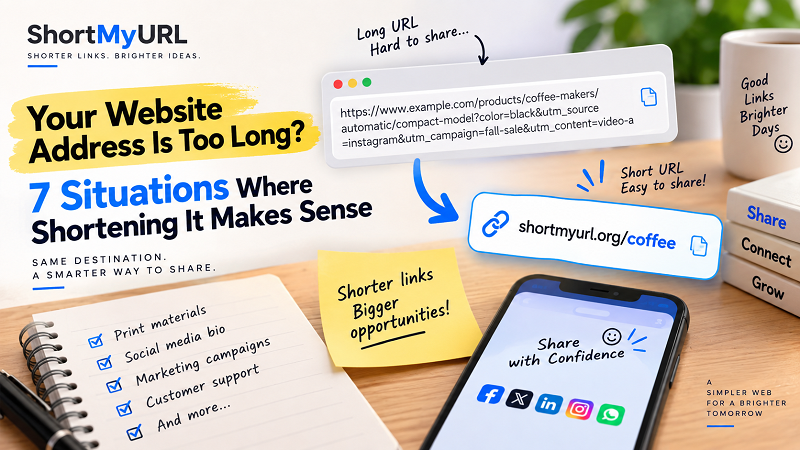
Your domain can be short while your links are anything but
Let's clear up one common misunderstanding first.
A website address isn't always just the domain.
example.com
is a domain and a very simple address.
But:
example.com/products/coffee-makers/automatic/compact-model?color=black&utm_source=instagram&utm_campaign=fall-sale
is also a website address. It's simply pointing to a specific location rather than the homepage.
This distinction matters because many people think they need to change their domain when what they actually need is a more convenient way to share individual pages.
If the website structure is working properly, there may be no reason to rebuild anything. The long address can remain exactly as it is while you create a shorter version for situations where presentation and convenience matter more.
1. You're sending a product page to a customer
Imagine you're chatting with a customer who asks for a specific product.
You copy the URL, paste it into the conversation, and suddenly your message contains a giant string of text that takes up several lines.
The customer probably doesn't care how the website organizes its product catalog. They care about getting to the product.
A shorter shareable address can make the interaction feel much cleaner, particularly when you're sending links repeatedly through messaging apps, customer support conversations, or social media.
The important part is that the shortened link should still take the person directly to the intended product page.
2. You're putting a link on printed material
Digital links are easy because someone can tap them.
Printed links don't have that luxury.
If you're creating a flyer, business card, poster, menu, event invitation, or handout, a long URL can quickly become an ugly block of tiny text. Making the font smaller isn't exactly a brilliant solution either; if people can't read the address comfortably, the link has already lost its usefulness.
This is one of the clearest situations where a shorter website address can help.
There's less to print, less to read, and less to type if someone enters the address manually.
For printed material, every character has a cost—not necessarily a financial one, but a readability cost.
3. You're sharing a landing page for a campaign
Campaign pages are notorious for producing lengthy URLs.
A marketing team may have a perfectly sensible destination such as:
example.com/summer-sale
Then tracking parameters get added:
example.com/summer-sale?utm_source=facebook&utm_medium=paid&utm_campaign=summer2026&utm_content=video-a
Those parameters may be valuable for measuring campaign performance. But there's a difference between the URL your analytics system needs and the address you want customers to stare at.
This is where shortening can create a useful layer between the technical destination and the public-facing link.
You don't necessarily need to sacrifice tracking simply to make the link easier to share. The short link can point to the complete campaign URL.
4. You're sharing a link in a social media bio
Bio space is precious.
Whether you're managing a personal profile, creator account, business page, community, or campaign account, you don't want a complicated address taking up attention when the actual destination is what matters.
A short link can also be easier to recognize when someone sees it alongside other profile information.
There's another advantage: if the destination changes later, depending on the setup you're using, you may be able to update where the short link points without having to redesign every piece of content where that link appeared.
That can be particularly useful for recurring campaigns.
5. You're sending the same website address again and again
Here's a less obvious use case.
Suppose you're a support agent, salesperson, teacher, community manager, or small-business owner who sends the same page dozens of times every week.
Technically, copying and pasting the full URL isn't difficult.
But repeated friction adds up.
A compact link can become a reusable piece of your communication toolkit. Instead of hunting through browser history for the correct page or pasting an enormous address into every conversation, you have one concise link ready to go.
This isn't about saving seconds on a single message.
It's about removing a small annoyance from a workflow you repeat hundreds of times.
6. You're sharing a URL that contains information people don't need to see
Some website addresses contain parameters that are useful to software but meaningless to the person receiving the link.
You might see things such as:
?source=...
?campaign=...
?session=...
?filter=...
or a collection of IDs and values that make sense to the website but look like gibberish to everyone else.
Again, those parameters aren't necessarily bad. Some are essential to the page or analytics system.
But the recipient usually doesn't need to understand the machinery behind the destination.
A shorter shareable URL can act as a cleaner front door while leaving the underlying destination intact.
7. You want a link that looks intentional
This one is surprisingly important.
A long URL can make a link look like something the website generated automatically and forgot to clean up.
A concise link, on the other hand, can feel deliberate.
That's useful when you're communicating professionally. A link in a proposal, presentation, sponsorship document, event announcement, or promotional message is part of the overall presentation.
People notice messy details even when they don't consciously think about them.
A cleaner link won't magically make a weak offer stronger, of course. But when everything else is polished, an enormous URL can stick out like a loose thread on an otherwise well-made jacket.
So, should every website address be shortened?
No.
And that's actually a good thing.
If you're sharing:
example.com
there's little reason to shorten it.
The same applies to a short, readable URL such as:
example.com/contact
or:
example.com/pricing
These addresses are already doing their job well.
The strongest candidates for shortening tend to be URLs that are long because of technical complexity, rather than because the actual page needs a long human-readable path.
The goal isn't to shorten everything.
It's to shorten the links that benefit from being shorter.
What about removing parts of the URL manually?
This is where caution pays off.
You might look at a long address and think, “I can just delete everything after the question mark.”
Sometimes that works.
Sometimes it doesn't.
Parameters can influence search results, product variants, filters, sessions, campaign tracking, or other website behavior. Removing them without knowing what they do can change the destination or eliminate information the website needs.
If you don't control the website, don't treat URL editing like trimming a sentence.
A safer approach is to preserve the original destination and create a separate short version when appropriate.
That way, you're not gambling with the URL that actually powers the page.
What should you check before creating a short version?
Not all shortening services work in exactly the same way, so a little due diligence is worthwhile.
Look at the destination first. Make sure you're shortening the exact page you intend to share.
Then check the resulting link yourself. Don't assume that because a service generated it, everything is automatically fine.
Open the short link in a browser. Confirm that it reaches the right page. If you're using it in a campaign, test it before distributing the link widely.
For important or long-lived links, also consider whether the service provides features such as custom aliases, click statistics, link management, and reliable redirects.
And perhaps most importantly, consider longevity.
A short link printed on a brochure might remain in circulation for months or years. A link used for a one-day social post has a very different lifespan.
The more permanent the material, the more carefully you should choose the service behind the short URL.
A simple rule: shorten for the situation, not for the sake of it
Here's a useful way to think about the whole thing.
Don't look at a URL and ask:
“Is this too long?”
Ask:
“Is this address unnecessarily difficult to use in this particular situation?”
Those are two very different questions.
A 70-character URL inside a developer ticket might be perfectly reasonable. The same URL printed on a restaurant flyer could be a terrible user experience.
Context changes everything.
If you're regularly sharing long website addresses and want a cleaner version for customers, social posts, printed materials, or campaigns, a shorten website address tool can provide a simple layer between the original destination and the link you actually distribute.
The website itself doesn't have to change. Your CMS doesn't have to be rebuilt. Your domain doesn't have to be replaced.
Sometimes all you need is a better way to package the address you're already using.
The best short link is the one that removes friction
There is a temptation to treat short URLs as a cosmetic trick—as if the only goal were making a link look prettier.
That's underselling them.
A well-used short link can make a message easier to scan, a printed URL easier to type, a campaign easier to distribute, and a repeated workflow slightly less annoying.
But shortening is most useful when it solves a specific problem.
So before turning every long URL on your website into a tiny link, look at how each address is actually being used.
If people are struggling to copy it, read it, type it, recognize it, or fit it into the space available, you've found a legitimate reason to shorten it.
If none of those things are happening, there's probably nothing to fix.
And that's the real trick: don't make URLs shorter just because you can. Make them shorter when doing so makes the user's next step easier.